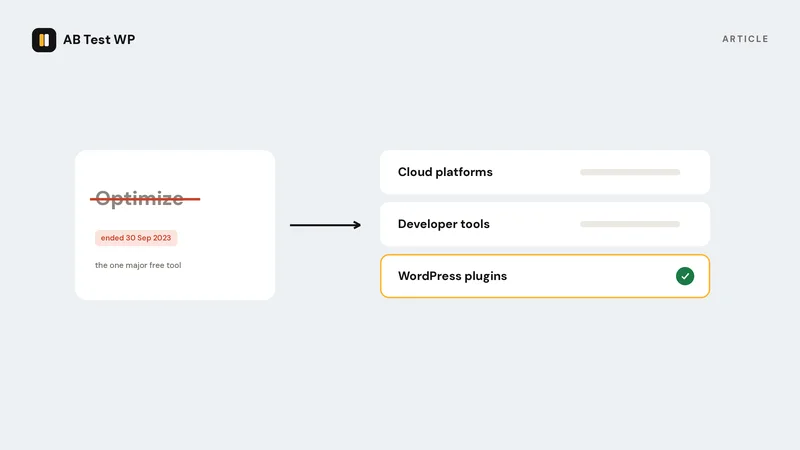
Google Optimize was, for most small and mid-sized sites, the only A/B testing tool that was both free and serious. It ran A/B, multivariate and redirect tests, it read goals straight out of Google Analytics, and it cost nothing below the enterprise tier. When Google announced in January 2023 that it would shut down that September, it pointed users toward third-party tools with GA4 integrations rather than building a replacement into GA4 itself. That is still the situation. There is no Google-made on-site A/B testing tool today.
So "what replaced it" has no single answer. What happened instead is that the market split along three lines, and which line you should follow depends on your traffic, your budget and how much you care about where your visitors' data goes.
What Optimize actually gave you, so you know what to replace
It is worth being precise, because the replacements each drop something.
- Free. The free tier had limits (a handful of simultaneous experiments, capped multivariate combinations) but no visitor metering. Traffic did not cost you anything.
- Visual editor plus code. You could change a headline in a point-and-click editor or inject CSS and JavaScript.
- Goals from Analytics. Any GA goal or event became a test objective without extra setup.
- Redirect tests. Send half your traffic to a different URL.
- A Bayesian results view with probability-to-beat-baseline, which was easier to read than p-values.
- And the costs: a third-party script on every page, an anti-flicker snippet that hid the page briefly on load, visitor data flowing through Google's infrastructure, and a dependency on Universal Analytics, which itself was retired in 2024.
The last four points are why some teams treated the shutdown as an opportunity rather than a loss.
The three directions people went
1. Cloud testing platforms
VWO, Optimizely, AB Tasty, Convert and similar tools are the closest functional match: a visual editor, statistics, segmentation, integrations with GA4. They are also what Google's own migration guidance pointed to. Some, VWO in particular, offer a free or low-cost starter tier metered by monthly tested visitors; Optimizely and AB Tasty sell to enterprises and do not publish self-serve pricing.
What you get: the most complete feature sets available, mature statistics, and support teams. What you give up: a monthly bill that scales with traffic, a third-party script and flicker snippet on every page, and visitor data processed on the vendor's servers, which means a data-processing agreement, a privacy-policy update and, in Europe, a consent question. For a site that outgrew Optimize's limits and has budget, this is the natural path. We compare the two most common choices on their own pages: VWO and Optimizely.
2. Developer-first experimentation platforms
GrowthBook, PostHog and Statsig came from the product-engineering world rather than marketing. They treat an experiment as a feature flag with statistics attached, and they are strong if you have developers who will wire variants in code. GrowthBook and PostHog can be self-hosted, which addresses the data question directly.
What you get: rigorous statistics, feature-flag workflows, and the option to keep data in-house. What you give up: the visual editor. Changing a headline means a developer, an SDK and a deploy. For a WordPress marketing site run by a marketer, this is usually the wrong tool, however good it is.
3. WordPress-native plugins
If the site is WordPress, the test can live in WordPress. This is the direction that did not exist in a mature form when Optimize launched and has grown since it closed.
- Nelio A/B Testing is the longest-established. It runs tests on pages, headlines, menus and themes, with a free tier metered by pageviews and paid plans above it. Much of its processing happens on Nelio's servers.
- Thrive Optimize is part of the Thrive Suite and requires Thrive Architect as the page builder. Excellent if you are already in that ecosystem; a non-starter if you are not.
- Split Hero is a WordPress-focused SaaS for split-URL tests, priced monthly by active campaigns, with results on its own platform.
- AB Test WP is ours, so weigh this paragraph accordingly. It is not released yet. The design goal is the part of Optimize that nobody replaced: free with no traffic metering, working in any builder or theme by matching a CSS class, and running entirely on your own server so no visitor data goes anywhere. The Optimize comparison page sets out where it matches and where it does not.
What you get: no external dependency, often no per-visitor cost, and, for the self-hosted ones, a much simpler privacy position. What you give up: depth. None of these match a cloud platform's segmentation or personalisation, and some tie you to a specific builder.
The trade-offs, side by side
| Question | Cloud platforms | Developer platforms | WordPress plugins |
|---|---|---|---|
| Free tier without visitor metering | Rarely | Sometimes, self-hosted | Varies by plugin |
| Visual editing, no developer | Yes | No | Mostly yes |
| Works in any WordPress builder | Yes, via script | Via code | Depends on the plugin |
| Visitor data stays on your server | No | If self-hosted | Depends on the plugin |
| Extra script and flicker snippet | Yes | Usually | Depends on the plugin |
| Segmentation and personalisation depth | Deepest | Deep | Shallowest |
| GA4 integration | Built in | Built in or via SDK | Rare |
How to choose, in four questions
- How much traffic reaches the pages you would test? Under a few thousand visitors a month per page, a metered cloud plan is paying for capacity you cannot use, and a small-effect test will not conclude anyway. Read how many visitors a test needs before you sign anything.
- Who will build the variants? A marketer with a page builder needs a visual or class-based tool. A product team with engineers can use flags.
- Where may visitor data go? If your privacy policy, your customers or your regulator care, a self-hosted tool removes an entire category of obligations: no vendor DPA, no international transfer, no consent question about a third-party script. The cookieless testing and GDPR article goes through what is and is not required.
- What did you use in Optimize? If you leaned on multivariate tests or Analytics audiences, only the cloud platforms replace that today. If you ran headline and layout A/B tests with a conversion goal, every category covers it.
The honest summary
Nothing replaced Optimize one-for-one. Cloud platforms replaced its features and added a bill. Developer tools replaced its rigour and removed the editor. WordPress plugins replaced its price and its simplicity, at the cost of depth. Pick the axis that matters to you.
Migrating what you had
Optimize experiment history was not exportable in a form any other tool imports, so your past results live in whatever notes you kept. Three practical steps if you are moving now, years late, from a site that simply stopped testing when Optimize closed:
- Remove the old snippet. Plenty of sites still load the Optimize container and anti-flicker script for nothing. It is dead weight and a small delay on every page view.
- Rebuild goals in the new tool from your GA4 events, or, for a self-hosted plugin, directly as page-visit, click, form-submission and add-to-cart goals.
- Re-run your best historical winner as the first test. It validates the new setup against a result you already trust, and it is the cheapest way to learn the tool.
Frequently asked
Does GA4 have A/B testing built in?
No. GA4 can receive experiment data from third-party tools that integrate with it, and Google Ads has its own campaign experiments, but there is no on-site content testing in GA4.
Is there a free replacement?
Free without limits is rare. Some cloud tools offer a metered starter tier; some WordPress plugins offer a free tier metered by pageviews; open-source developer platforms are free if you host them. Unmetered, free and visual is the gap our own plugin is built for, and it is on the waitlist rather than in the directory yet.
Can I still use my Optimize experiments?
No. The service, the editor and the data are gone. What survives is your knowledge of what won, which is worth writing down before it fades.
Do I need a tool at all?
For a site with a few hundred visitors a month, honestly, no. Make the obvious improvements, measure before and after with the seasonal pattern in mind, and start testing when a single page has enough traffic to finish a test in a month.
Competitor details above are general descriptions as of writing and can change; check each vendor's current plans. Every comparison page on this site says plainly where the other tool is the better choice.
Sources
- Optimize and Optimize 360 sunset, Google Help, checked September 2026
- Website testing and Google Search, Google Search Central, checked September 2026
Common questions
What replaced Google Optimize?
Nothing from Google. Users moved in three directions: cloud testing platforms such as VWO, Optimizely and AB Tasty; developer-first experimentation tools such as GrowthBook and PostHog; and WordPress-native plugins. Each replaces a different part of what Optimize offered.
Does GA4 have A/B testing built in?
No. GA4 can receive experiment data from third-party tools that integrate with it, but there is no on-site content testing in GA4 itself.
Is there a free replacement for Google Optimize?
Free without visitor limits is rare. Some cloud tools have a metered starter tier, some WordPress plugins meter a free tier by pageviews, and open-source developer platforms are free if you host them yourself.
When did Google Optimize shut down?
Google announced the sunset in January 2023 and switched Optimize and Optimize 360 off on 30 September 2023. Experiment history was not exportable to other tools.