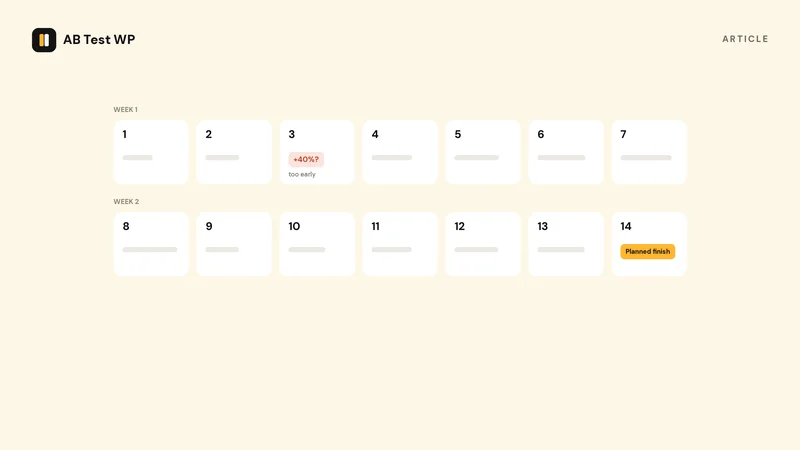
Every A/B testing tool will happily show you a live confidence number while your test runs. Watching that number and stopping the moment it crosses 95% feels rigorous. It isn't. Confidence bounces around a lot early in a test, and if you check repeatedly and stop on a spike, you'll routinely "detect" differences that don't exist. Statisticians call this the peeking problem - Evan Miller's classic How Not To Run an A/B Test shows how badly repeated checking inflates false positives - and it's the single most common way honest people fool themselves.
Updated July 2026
Key takeaways
- Decide the duration before you start, from a planned sample size and whole business cycles.
- Watching the live confidence number and stopping when it crosses 95% inflates false positives badly.
- Run for complete weeks, at least one and ideally two or more, even if you reach the sample mid-week.
- A page converting at 3% needs about 13,900 visitors per variant to detect a 20% lift: roughly four weeks at 1,000 visitors a day.
The right answer: decide before you start
A trustworthy test length is set in advance, from two ingredients:
- A planned sample size. Given your current conversion rate and the smallest improvement you'd care about, statistics can tell you how many visitors you need per variant. Run until you reach that number - not until the result looks good.
- Whole business cycles. Visitors behave differently on a Tuesday morning than a Saturday night. Run for complete weeks (one at minimum, ideally two or more) so weekday and weekend behaviour are both represented, even if you hit your sample size mid-week.
A worked example
Say your landing page converts at 3%, and you want to detect a 20% relative lift (from 3% to 3.6%) at 95% confidence with 80% power - the standard settings. The math works out to roughly 13,900 visitors per variant, about 27,800 in total. At 1,000 visitors a day, that's around 28 days: a four-week test.
You don't need to do this by hand - our free sample-size calculator gives you the visitor count and duration from those same inputs, and the planner built into AB Test WP does the same inside WordPress before you launch.
Notice what the example implies: smaller effects and lower baseline rates need dramatically more traffic. Halve the effect you want to detect and the required sample roughly quadruples. This is why low-traffic sites should test bold changes - a new headline and offer, not a slightly different shade of button.
Rule of thumb
Plan the sample size first, run for whole weeks, and don't act on the live numbers mid-test. If you reach your planned sample and the result isn't significant, that's a real finding too: the change probably doesn't matter much. Keep the simpler version and test something bolder.
When stopping early is legitimate
Two situations justify ending a test before plan. The first is a broken variant - if one version errors, renders wrong, or blocks checkout, stop and fix it; the data is worthless anyway. The second is a sample-ratio mismatch (SRM): if you configured a 50/50 split but traffic is landing 60/40, something in your setup is skewing assignment and the results can't be trusted. Good tools check this for you - AB Test WP Pro flags SRM automatically.
And when to stop late
Don't let a test run forever hoping significance eventually arrives. If you're well past your planned sample and the variants are still neck and neck, call it: inconclusive is an answer. Long-running tests also grow stale - seasonality, campaigns, and returning visitors slowly muddy what you're measuring. Decide, document what you learned, and move to the next hypothesis.
Ready to put this into practice? The free AB Test WP plugin includes the sample-size planner, runs cookieless with no traffic limits, and works with any WordPress builder. Get notified at launch.
Sources
- How not to run an A/B test, Evan Miller, checked September 2026
- Website testing and Google Search, Google Search Central, checked September 2026